

Executing a successful Shopify migration requires understanding both the 'why' and the 'how' of the transition, while carefully planning to avoid the common mistakes that many stores face as they replatform.
The high seas adventure of your first launch
Remember the rush of adrenaline you got when you first thought of starting your own business? You thought it was a little bit crazy, but it felt so right. You knew it was going to be a lot of work, but you also knew, deep down, that it was going to be a lot of adventure, too. You kind of felt like you were sailing off into the sunset to find your fortune, with a dose of adventure along the way.

Your fortune was waiting for you out there somewhere if you could only sail your business-ship through all the waters between you and it. In the early years, adrenaline and optimism was enough, and through your hard work, your business thrived, but in time you began to find the shortcomings of the vessel you’d launched your business in.
You began to think it was maybe time to change, not your business, but your vessel.
Why Replatform: Trading your leaky skiff for an ocean liner
Every e-commerce merchant reaches a point where the vessel that got them to their first milestone simply can’t take them any further. When you first launched, a modest, cobbled-together setup (perhaps a basic WordPress site, a few cheap plugins, and a budget hosting plan) was more than enough. You were nimble. You could steer instantly and make quick pivots when you needed to.
But as your business grows, that cozy little skiff starts taking on water. As the author John A. Shedd famously wrote, “A ship in harbor is safe, but that is not what ships are built for.” If your goal is to venture out of the safe harbor of your early stages and conquer the open seas of global commerce, you need a vessel built for the journey.
Your old platform isn’t up for the journey
Here is why your starter boat is holding you back, and why it’s time to upgrade to an ocean liner.
The drag of the barnacles: sluggish page speeds
Think about the underside of your current website. Over years of operation, it has inevitably accumulated a massive colony of digital barnacles. Every added plugin, custom script, and app drags on your page-load times.
In modern e-commerce, having a slow site is a silent killer. Today’s shoppers expect instantaneous page loads; if your site lags by even two or three seconds, shoppers aren't going to wait. They will abandon ship for a quicker competitor.
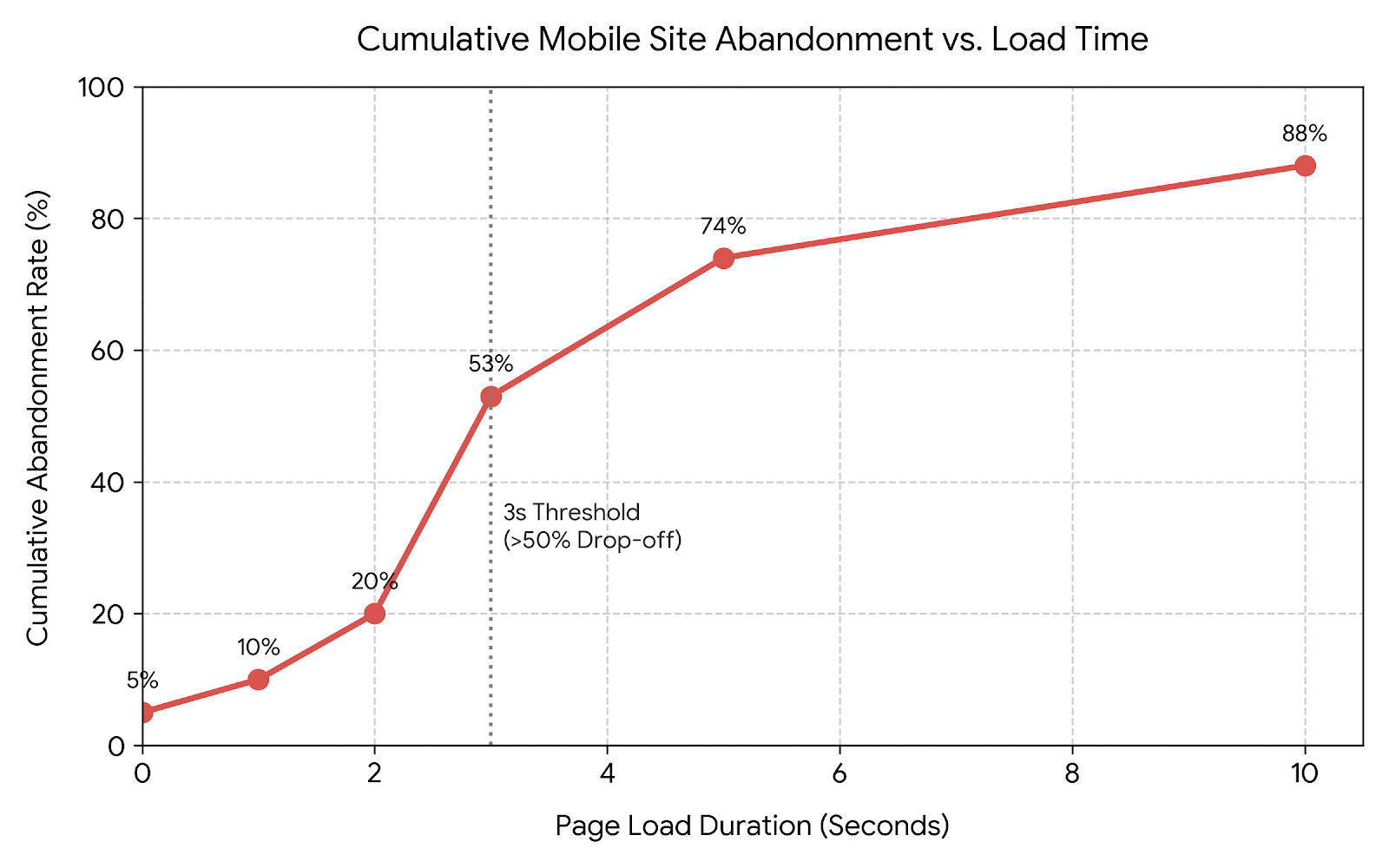
Replatforming scrapes away years of accumulated technical debt, giving your business a clean, hydrodynamic hull that slices through the digital waves at top speed.
Riding Out the Storm: Scaling Through Traffic Spikes
Then there is the unpredictable weather of the digital market. Your skiff was built for calm waters, not the howling gales of a Black Friday rush, a holiday shopping season, or a viral social media mention. When a sudden wave of traffic hits a legacy platform, the server buckles, the site crashes, and your customers are greeted with a “503 Service Unavailable” screen.

In essence, you’ve pitched your ready-to-buy customers overboard into a freezing sea. A modern, enterprise-grade platform, though, acts like a massive ocean liner. It is engineered with the infrastructure to absorb huge surges of traffic without a single shudder, ensuring every passenger enjoys a smooth trip to the checkout page.
Relieving the crew: streamlining your back-end operations
Finally, we must look at the day-to-day grind of your crew—your operations, marketing, and development teams. On an outdated platform, routine tasks require manual heroics. Your team is likely wrestling with clunky dashboards, manually syncing inventory across channels, and fixing code that mysteriously breaks overnight.
The processes are probably running them ragged!

All of this is the operational equivalent of trying to sail a nineteenth-century schooner with half a crew. With determination you can stay afloat and on course, but just barely, and it’s exhausting.
Modern platforms offer automation, seamless integrations, and intuitive management tools instead. By upgrading, you hand your crew GPS and automated rigging, freeing them from tedious maintenance so they can focus on steering the business toward new growth.
If you’re ready to stop bailing water and start scaling up, it’s time to move on from the starter skiff.
Chart Your Course: pick your flagship and plan your voyage
Once you’ve accepted that your starter boat has reached the end of the line, it’s time to plot your escape. You wouldn’t set sail across the Atlantic without a reliable ship, a solid map, and a well-briefed crew. Replatforming requires the exact same level of preparation.
Choosing the Right Vessel: why Shopify fits best
When looking at the shipyards of e-commerce, you have plenty of options. You might consider retrofitting an open-source behemoth like Magento, or perhaps lingering in the shallows with Squarespace or Wix. You might even eye BigCommerce or lean on the plugin-heavy patchwork of WooCommerce.

For most growing merchants, however, the answer is clear: it’s time to board Shopify.
Shopify is essentially the purpose-built ocean liner of the e-commerce world. While older platforms require you to constantly duct-tape separate plugins together just to do everything you need, Shopify has evolved into a powerhouse with native features built right into the hull.
Features that used to require a dozen third-party apps on Shopify—from bundling products to built-in B2B functionality—are now native out of the box. Shopify offers the rare combination of robust enterprise capability and a user-friendly deck that doesn’t require a graduate degree in cartography to navigate.
Assembling the Crew: buy-In before you set sail
Before you set sail on your migration journey, you need to gather your crew. Replatforming is not a solo voyage; it affects everyone from marketing and customer service to fulfillment and finance.
If you spring this massive migration on your team at the eleventh hour, you should expect a mutiny. Instead, bring key stakeholders and the people who actually do the daily work into the planning room early.
Yes, transitioning to a new platform requires some painful, heavy lifting up front. You’ll need to gently remind your team that enduring this temporary squall of extra work will save them countless hours of frustration down the line. When everyone understands why you are upgrading, they’ll be much more eager to grab an oar.
Avoiding scope creep during your Shopify migration
Finally, you need a strictly-plotted course, and you must stick to it. The biggest hazard that sinks replatforming projects isn’t technical failure, it’s scope creep.
Once you start planning your new Shopify build, it’s dangerously easy to fall into the trap of wanting all the bells-and-whistles under the sun. “Wouldn’t it be nice if we also redesigned the logo, rebuild the blog, and integrated three new loyalty programs?”
“Is this additional feature essential to a successful launch, or can it wait to be added as a later enhancement?”
Before you approve another change request during your Shopify migration, ask your team if this is a ‘must-have’ to keep the ship afloat, or ‘extra cargo’ for a future voyage.
If you try to build the Titanic on your first day out, your project will drag on indefinitely and blow up your budget. Sit down, prioritize the core features you actually need to launch successfully, and ruthlessly cut the rest. Save the secondary upgrades for later, once your new ocean liner is safely out of port and cruising smoothly, maybe even with a few voyages behind her.
Move Your Cargo: Navigating the perils of data migration
Once your course is charted and your new Shopify vessel is prepped in the shipyard, it’s time for the most delicate and nerve-wracking phase of the entire voyage: moving your cargo.
In e-commerce, your “cargo” isn't physical inventory sitting in a warehouse; it is everything else that keeps your business going. We are talking about your product catalogs, customer account lists, historical order data, ancillary pages, blog posts, and your hard-earned SEO-laden URLs and metadata.
Lost at Sea: What happens when cargo goes missing
Imagine pulling your magnificent new ocean liner into port, only to realize half your cargo tumbled overboard somewhere in the middle of the Atlantic. A botched migration can spell absolute disaster.
If your products fail to transfer correctly during your Shopify migration, you are left with broken pages and bewildered shoppers. If your customer accounts and order histories vanish, your loyal buyers will suddenly find themselves locked out, unable to track past purchases.
And if your URLs aren't mapped properly from your old platform to Shopify, any search engine link or bookmarked page will swirl into a dreaded 404 error. You’ll be turning away eager passengers right as they try to board, sending them running straight into the welcoming arms of your competitors.
Securing the Hold: Apps, agencies, and double-checking
So, how do you successfully transfer everything without losing a crate? You have a few tools at your disposal: purpose-built migration apps and, for more complex fleets, specialized agency partners who live and breathe this work.
Whether you use an automated app to lift and shift your database or enlist seasoned deckhands to handle the heavy lifting, the golden rule of data migration is simple: trust, but verify, leaning more heavily into the verify.

You cannot simply hit “export,” cross your fingers, and hope for the best. You need to run test batches, comb through the manifests, and double-check every category, customer tag, and URL redirect before the grand opening. Ensure your old URLs cleanly forward to your new Shopify product pages so you don't lose a bit of search engine authority.
Once you get your cargo safely stowed in the new hold and verify the inventory, you’ll be ready to test the waters.
Sea Trials: Testing your new Shopify vessel before the maiden voyage
With your cargo safely stowed in the hold, you might be tempted to smash the hull with a champagne bottle and open for business immediately. Pause a bit, though. Before you invite paying passengers onto your new ocean liner, you need to take her out for proper sea trials in a development environment.
This phase is all about walking the decks, checking the rigging, and making sure the ship doesn't take on water the moment it hits the open ocean.
Testing the user flows and integrations
Start by stepping into your customers' shoes. Walk through every critical user flow on the dev site, from browsing a category page to completing a purchase. Test your checkout process with a live transaction to ensure the payment gateways actually process funds, your shipping calculators spit out the right numbers, and your automated email triggers fire off as expected.
Don't forget to check how the vessel handles different seas. Check out the site on a desktop, a tablet, and a tiny smartphone. If your mobile layout is too cluttered or the buttons overlap, you’re essentially tossing your mobile shoppers overboard. As Hubspot reported, even back in 2025 mobile browsing accounted for about 78% of ecommerce traffic (HubSpot Marketing Statistics) and it’s not likely that number has gone down this year.
Swabbing the Deck: Ensuring accessibility for all crew and passengers
General Shopify Accessibility Checklist
- Store has accessibility statement
- Store has accessibility log
- Menu is fully accessible
- Text colors have high enough contrast ratio with background
- Focus style is well designed and visually identifiable
- Multimedia is accessible and pausable
Crucially, the sea trials of your Shopify migration must include rigorous accessibility testing. After all, a truly great ship is welcoming to every single traveler. As I noted in “Time to Mop the Shop”, my guide to Shopify accessibility, ensuring your digital storefront is accessible is not merely a box-checking exercise; it is fundamental to good hospitality.
Before you launch, run through your accessibility checklist to make sure no one is left behind at the dock.
In addition to the general accessibility checklist items, also make sure that your product images have appropriate alt text, mega menus are accessible, if they're really needed, and apps don't introduce blocking accessibility issues. Make sure your checkout is accessible to keyboard-only and screen-reader users.
Once your sea trials are complete, your integrations are humming, and your decks are fully accessible, you are finally ready to raise anchor and set sail.
The Maiden Voyage: Executing a strategic launch
You’ve moved to a magnificent vessel, meticulously stowed your cargo, and run every conceivable sea trial. Now, it is finally time for the moment of truth: the maiden voyage.
Launching a new e-commerce site is thrilling, but it is also where amateur captains make rookie mistakes. If you want your flagship to cut through the waves rather than run aground on day one, you need a disciplined launch sequence.
Picking the Right Tide: Why Tuesday beats Friday
First, let’s address a common temptation: launching your on a Friday afternoon. It sounds poetic, doesn't it? Sailing off into the weekend... In reality, it is a fast track to disaster. If you launch on a Friday and a critical bug surfaces, your tech team and developers will be fast asleep or unreachable until Monday morning, leaving your customers stranded at sea with a broken site.
Instead, drop the anchor on your old site and hoist the sails on your new Shopify migration during a quiet mid-week morning, say a Tuesday. This gives your crew nearly a full work week ahead of them to troubleshoot, adjust the rigging, and handle any unexpected squalls while everyone is fully caffeinated and at their desks.
On a more commercial note, Elphick & Co, a digital branding and e-commerce development consultancy, point out that Tuesdays and Wednesdays have higher website traffic and engagement than other days of the week. If your goal is to make a splash right away, midweek is best.
Flipping the Switch: Domain handover and social fanfare
The actual technical transition is relatively straightforward. You’ll update your DNS settings, point your custom domain toward your new Shopify flagship, and power down the old server.
When you pull away from shore and head for open waters, it’s time to pop the champagne and let the world know. Put out a celebratory post across your social media channels announcing the fresh look, the upgraded speed, and the smoother shopping experience. Give your community a reason to come check out the newly polished decks.
The anchor is up, the sails are full, and our brand-new flagship store is officially LIVE! ⛵️🌊
We’ve traded our old leaky skiff for a state-of-the-art ocean liner (powered by Shopify!), and we couldn't be more thrilled. Expect lightning-fast page speeds, a seamless checkout, and a beautiful new design that makes browsing a breeze.
Come climb aboard, explore the new decks, and let us know what you think! 👇
All Hands on Deck: Expect a long, hard day
Finally, be prepared for a squall. Even after the most rigorous sea trials, something minor or even major will inevitably pop up.
On launch day, have your developers, customer service representatives, and management staff on standby. Expect customer friction, be ready to handle complaints or questions in person with a smile, and mentally prepare for a long, grueling day.
In fact, you should embrace the friction. The customer complaints means two things: first, you have a lot of customers engaging right away, and second, they’re as invested in helping you perfect your site as you are. They’re helping you find all those little things that still need adjustment. And the more they find right away, the quicker you can perfect your shop.
So roll up your sleeves, keep the deckhands close, and enjoy the open waters. Your grand voyage has officially begun.
Worth the Effort
Once you decide it's time for a Shopify migration, choose your vessel and chart your course, move your cargo over and do your sea trials, and then actually sail off into the future, you’ll find all the work of replatforming was well worth the effort. Your shop will hum along quickly and smoothly, not shuddering or throwing up blockers for your customers even in times of increased traffic. In fact, you’ll likely find that these times of increased traffic will become more and more common. With the increased ease and capacity of the new platform, you’ll thrive as you sail off into the sunset!